Agent-Mediated Scientific Workflows
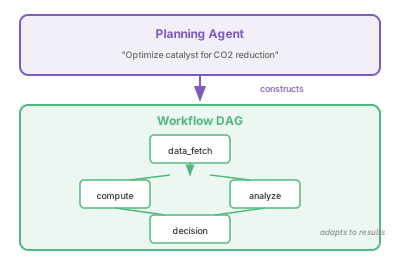
An agent that dynamically constructs and adapts workflows.
Code: View on GitHub
What It Does
Demonstrates agents that build workflows, not just execute them:
- Dynamic planning: Agent creates steps based on goal
- Adaptive execution: Modify plan based on intermediate results
- Failure recovery: Retry with different parameters
- Dependency management: Execute steps in correct order
This bridges agentic AI with traditional workflow systems (Parsl, Globus Flows).
Running the Example
Dynamic workflow from goal:
cd Capabilities/agent-workflows/AgentsWorkflow
python -m venv .venv && source .venv/bin/activate
pip install -r requirements.txt
python main.py --goal "Screen compounds for catalyst activity"
Use predefined template:
python main.py --workflow screening
python main.py --workflow optimization
List templates:
python main.py --list-templates
LLM Configuration
Supports OpenAI, FIRST (HPC inference), Ollama (local), or mock mode.
See LLM Configuration for details.
Workflow Architecture
Key Patterns
Dynamic step creation:
@tool
def create_workflow_step(step_id, name, task_type, parameters, depends_on):
    step = WorkflowStep(id=step_id, name=name, ...)
    return WORKFLOW.add_step(step)
Adaptive workflow modification:
@tool
def insert_step_after(after_step_id, step_id, name, task_type, parameters):
    # Insert new step based on intermediate results
    step = WorkflowStep(...)
    return WORKFLOW.insert_step_after(after_step_id, step)
Dependency-aware execution:
def get_ready_steps(self) -> list:
    completed_ids = {s.id for s in self.steps if s.status == COMPLETED}
    ready = []
    for step in self.steps:
        if step.status == PENDING:
            if all(dep in completed_ids for dep in step.depends_on):
                ready.append(step)
    return ready
Tools
| Tool | Description |
|---|---|
create_workflow_step |
Add a new step to the workflow |
insert_step_after |
Insert step after existing step |
remove_step |
Remove a step |
execute_next_step |
Run next ready step |
execute_all_ready_steps |
Run all ready steps (parallel) |
get_workflow_status |
Check progress |
get_step_result |
Get result of completed step |
modify_step_parameters |
Change parameters before execution |
Task Types
| Type | Description | Parameters |
|---|---|---|
data |
Fetch/prepare data | source, query |
compute |
Run calculations | calc_type, system |
analyze |
Analyze results | analysis_type |
decision |
Make decisions | condition, threshold |
Example: Screening Workflow
Workflow: Screen compounds for catalyst activity
Steps: 5
Status: {"completed": 5}

Steps:
  ● data_fetch: Fetch compound library [completed]
  ● filter: Filter by properties [completed]
  ● compute_batch: Compute binding energies [completed]
  ● rank: Rank candidates [completed]
  ● decide: Select top candidates [completed]

Step results:
  [Fetch compound library] Retrieved 150 records from pubchem
  [Filter by properties] property_filter analysis complete: Found 3 candidates
  [Compute binding energies] binding_energy calculation complete: Energy=-1523.4 eV
  [Rank candidates] ranking analysis complete: Found 3 candidates, top score=0.95
  [Select top candidates] Decision: PASS (score 0.72 > threshold 0.5)
Production Integration
This example simulates task execution. In production, integrate with:
- Parsl: Python parallel scripting library for HPC
- Globus Flows: Managed workflow automation service
- Prefect/Airflow: Workflow orchestration platforms
# Example Parsl integration
from parsl import python_app

@python_app
def compute_task(parameters):
    # Actual computation
    return run_dft_calculation(parameters)

# Agent creates workflow, Parsl executes
step = workflow.get_next_step()
future = compute_task(step.parameters)
step.result = future.result()
Requirements
- Python 3.10+
- LangGraph 1.0+
- OpenAI API key, FIRST token, Ollama, or run in mock mode