Stage 1: Local Agent Execution
Your on-ramp to CAF. No federation required.
Task
Implement and run a simple, persistent, stateful agentic application on a laptop or workstation, using local or remote LLMs.
Why This Matters
Local execution lets you develop and test agent logic before deploying to HPC. LangGraph and Academy specifications are reproducible and portable—the same agent definition runs locally or at scale.
Details
| Aspect | Value |
|---|---|
| Technologies | LangGraph, Academy |
| Where code runs | Laptop, workstation, VM |
| Scale | Single agent / small multi-agent |
| Status | Mature |
Getting Started
Building Scientific Agents — A three-stage guide covering:
- LLM Agents — Build agents that reason and call tools (LangGraph)
- Distributed Agents — Run agents across machines (Academy)
- Production Agents — Combine LangGraph + Academy for real deployments
| Additional Guides | Description |
|---|---|
| LLM Configuration | Configure OpenAI, Ollama, or FIRST backends |
Architecture
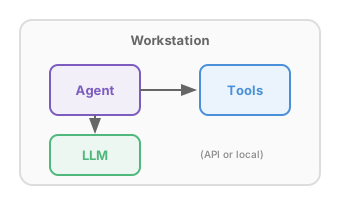
Here we deal with agentic applications in which one or more agents operate entirely locally, each potentially calling tools and/or LLMs.
Examples
Minimal Example: Calculator Agent
The simplest possible agent—an LLM that can use a calculator tool:
| Example | Framework | Code |
|---|---|---|
| AgentsCalculator | LangChain + LangGraph | View |
@tool
def calculate(expression: str) -> str:
    """Evaluate a mathematical expression."""
    return str(eval(expression, {"__builtins__": {}}, {}))

llm = ChatOpenAI(model="gpt-4o-mini")
agent = create_react_agent(llm, [calculate])
agent.invoke({"messages": [HumanMessage(content="What is 347 * 892?")]})
Tool Pattern Examples
These examples demonstrate different types of tools an agent can use:
| Example | Tool Type | What It Shows |
|---|---|---|
| AgentsRAG | Vector search | Retrieval-augmented generation from scientific documents |
| AgentsDatabase | Data queries | Natural language queries on pandas DataFrames |
| AgentsAPI | External APIs | Calling PubChem for chemical information |
| AgentsConversation | Memory | Stateful conversations with short and long-term memory |
Each example follows the same pattern as the Calculator but with more realistic, science-relevant tools.
Academy Examples
These examples demonstrate Academy framework patterns for distributed agent coordination:
| Example | Pattern | Description |
|---|---|---|
| AgentsAcademyBasic | Basics | Two agents communicating - the “Hello World” of Academy |
| AgentsRemoteTools | Remote Tools | Coordinator calls tools on a ToolProvider agent |
| AgentsHybrid | Hybrid | Academy + LangGraph: distributed agents with LLM reasoning |
| AgentsPersistent | Persistence | Checkpoint and resume workflows across restarts |
| AgentsFederated | Federation | Cross-institutional collaboration (ANL, ORNL, LBNL) |
Five-Agent Scientific Discovery Pipeline
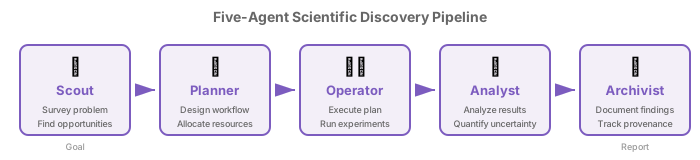
This more involved example demonstrates multi-agent coordination for scientific workflows. Five specialized agents work in sequence, each contributing domain expertise before passing results to the next:
| Agent | Role | Input | Output |
|---|---|---|---|
| Scout | Surveys problem space, detects anomalies | Goal | Research opportunities |
| Planner | Designs workflows, allocates resources | Opportunities | Workflow plan |
| Operator | Executes the planned workflow safely | Plan | Execution results |
| Analyst | Summarizes findings, quantifies uncertainty | Results | Analysis summary |
| Archivist | Documents everything for reproducibility | Summary | Documented provenance |
Implementations of Five-Agent Workflow
We provide implementations of this example in LangGraph and Academy, demonstrating different orchestration patterns. Note that these implementations are toys: they create agents that communicate, but each agent’s internal logic is just a stub.
| Example | Framework | Pattern | Code |
|---|---|---|---|
| AgentsLangGraph | LangGraph | Graph-based orchestration | View |
| AgentsAcademy | Academy | True pipeline (agent-to-agent) | View |
| AgentsAcademyHubSpoke | Academy | Hub-and-spoke (main orchestrates) | View |
Pattern comparison:
- LangGraph: StateGraph with typed state, edges define flow
- Academy Pipeline: Agents forward results directly to each other via messaging
- Academy Hub-and-Spoke: Main process orchestrates all agents sequentially
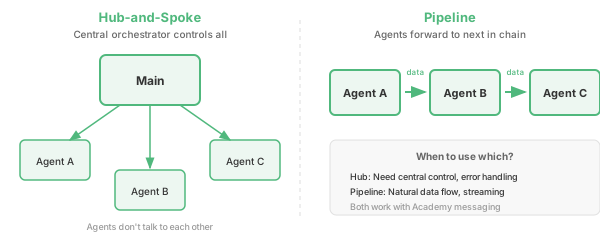
No LLM is used in the Academy examples—agent logic is stubbed to focus on the messaging patterns.
Dashboard Version
The dashboard version wraps agents with a full-screen Rich UI showing live progress across multiple scientific goals.
| Example | Framework | Features | Code |
|---|---|---|---|
| AgentsAcademyDashboard | Academy | Rich dashboard, multi-goal | View |