Academy Persistent State
Demonstrates how Academy agents can persist state and resume after restarts.
Code: View on GitHub
Why Persistent State?
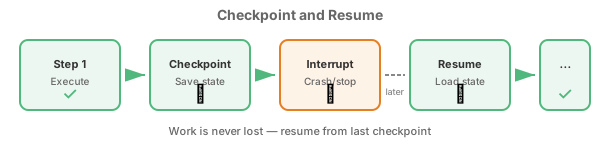
Scientific workflows often run for hours, days, or weeks. Persistent state enables:
- Resumability: Continue from where you left off after crashes or restarts
- Checkpointing: Save progress after each major step
- Auditability: Track what was done and when
- Efficiency: Don’t repeat completed work
Running the Example
cd Capabilities/local-agents/AgentsPersistent
python -m venv .venv && source .venv/bin/activate
pip install -r requirements.txt

# Run workflow (will checkpoint to .workflow_state/)
python main.py

# To see resumption in action:
# 1. Start workflow, Ctrl+C to interrupt mid-way
# 2. Run again - it resumes from last checkpoint

# Start fresh (ignore existing checkpoints)
python main.py --reset

# Custom state directory
python main.py --state-dir ./my-experiment-state
Example Output
First run (complete):
============================================================
ACADEMY PERSISTENT STATE EXAMPLE
============================================================
State directory: .workflow_state
Reset: False
Task: discover catalysts for sustainable ammonia synthesis
------------------------------------------------------------
Starting fresh workflow
------------------------------------------------------------
17:00:00 [academy.persist] [Workflow] Starting task: discover...
17:00:00 [academy.persist] [Workflow] Starting fresh workflow
17:00:00 [academy.persist] [Workflow] Executing step 1/5: literature_review
17:00:01 [academy.persist] [Workflow] Step 1 complete, checkpoint saved
17:00:01 [academy.persist] [Workflow] Executing step 2/5: data_collection
...
17:00:03 [academy.persist] [Workflow] All steps completed
------------------------------------------------------------
WORKFLOW COMPLETED
------------------------------------------------------------
Status: completed
Steps completed: 5
============================================================
Interrupted run + resume:
# First run (interrupted with Ctrl+C after step 2)
$ python main.py
...
17:00:00 [academy.persist] [Workflow] Executing step 2/5: data_collection
^C
------------------------------------------------------------
WORKFLOW INTERRUPTED
------------------------------------------------------------
Progress saved at step 2/5
Run again to resume from this point
============================================================

# Second run (resumes from step 3)
$ python main.py
...
Resuming from step 2/5
------------------------------------------------------------
17:00:10 [academy.persist] [Workflow] Resuming from step 2
17:00:10 [academy.persist] [Workflow] Skipping completed step 1: literature_review
17:00:10 [academy.persist] [Workflow] Skipping completed step 2: data_collection
17:00:10 [academy.persist] [Workflow] Executing step 3/5: computation
...
Key Concepts
1. State Management Class
class AgentState:
    """Manages persistent state for an Academy agent."""

    def __init__(self, agent_name: str, state_dir: Path):
        self.state_file = state_dir / f"{agent_name}_state.json"
        self._load()  # Load existing state if present

    def set(self, key: str, value) -> None:
        """Set a state value and save to disk."""
        self._state[key] = value
        self.save()  # Auto-persist on change

    def get(self, key: str, default=None):
        """Get a state value."""
        return self._state.get(key, default)
2. Checkpointing After Each Step
@action
async def execute_workflow(self, task: str) -> dict:
    current_step = self._state.get("current_step", 0)

    for i, (step_name, step_func) in enumerate(steps):
        if i < current_step:
            logger.info(f"Skipping completed step {i+1}: {step_name}")
            continue

        # Execute step
        result = await step_func(task)

        # Checkpoint progress
        self._state.set("current_step", i + 1)
        self._state.set("step_results", step_results)
3. Graceful Interruption Handling
try:
    results = await workflow.execute_workflow(task)
except asyncio.CancelledError:
    status = await workflow.get_status()
    print(f"Progress saved at step {status['current_step']}")
    print("Run again to resume")
State File Format
State is stored as JSON for transparency and debugging:
{
  "created_at": "2026-02-04T17:00:00.000000",
  "updated_at": "2026-02-04T17:00:02.500000",
  "task": "discover catalysts for sustainable ammonia synthesis",
  "current_step": 3,
  "step_results": [
    {
      "step": 1,
      "name": "literature_review",
      "result": "Reviewed 47 papers...",
      "completed_at": "2026-02-04T17:00:00.500000"
    },
    ...
  ],
  "status": "in_progress"
}
Production Considerations
| Aspect | Development | Production |
|---|---|---|
| Storage | Local filesystem | Object store (S3), database |
| Format | JSON | Consider binary for large state |
| Locking | None | Use file locks for concurrent access |
| Backup | Manual | Automated snapshots |
Comparison to AgentsCheckpoint
Both examples demonstrate persistent state, but with different approaches:
| Feature | AgentsPersistent (this) | AgentsCheckpoint |
|---|---|---|
| Framework | Academy | LangGraph |
| State format | Custom JSON | LangGraph checkpoints |
| Distribution | Multi-machine ready | Single process |
| Best for | Distributed workflows | LLM reasoning chains |
Related Examples
Prerequisites:
- AgentsAcademyBasic - Academy fundamentals
- AgentsRemoteTools - Remote tool pattern
Next steps:
- AgentsFederated - Cross-institutional collaboration
- AgentsHybrid - Add LLM reasoning to persistent workflows
- Long-Lived Agents - Extended agent lifecycles
Alternatives:
- AgentsCheckpoint - LangGraph checkpointing (different approach)
Requirements
- Python 3.10+
- academy-py