Stage 3: Production Agents (LangGraph + Academy)
Combine LLM intelligence with distributed execution for production scientific agents.
The Architecture
Production agents need both frameworks:
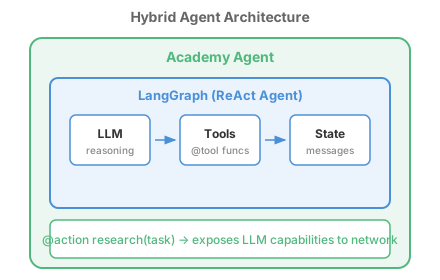
Division of labor:
| Layer | Framework | Responsibility |
|---|---|---|
| Intelligence | LangGraph | LLM reasoning, tool calling, ReAct loops |
| Distribution | Academy | Messaging, federation, persistence, security |
The Hybrid Pattern
An Academy agent with LangGraph inside:
from academy.agent import Agent, action
from langchain_openai import ChatOpenAI
from langchain_core.tools import tool
from langchain_core.messages import HumanMessage
from langgraph.prebuilt import create_react_agent

# Define tools for the LangGraph agent
@tool
def search_literature(query: str) -> str:
    """Search scientific literature for relevant papers."""
    return f"Found 23 papers on '{query}'"

@tool
def run_calculation(expression: str) -> str:
    """Evaluate a mathematical expression."""
    return str(eval(expression, {"__builtins__": {}}, {}))

class ResearcherAgent(Agent):
    """Academy agent with LangGraph intelligence."""

    def __init__(self):
        super().__init__()
        self._langgraph_agent = None

    def _init_langgraph(self):
        """Initialize LangGraph agent on first use."""
        if self._langgraph_agent is None:
            llm = ChatOpenAI(model="gpt-4o-mini")
            tools = [search_literature, run_calculation]
            self._langgraph_agent = create_react_agent(llm, tools)

    @action
    async def research(self, task: str) -> dict:
        """Use LLM reasoning to complete a research task."""
        self._init_langgraph()

        # LangGraph handles the intelligent reasoning
        result = self._langgraph_agent.invoke({
            "messages": [HumanMessage(content=task)]
        })

        return {
            "task": task,
            "findings": result["messages"][-1].content
        }
Key insight: The @action decorator exposes the intelligent behavior to other Academy agents. They can call researcher.research("find catalysts for CO2 reduction") from anywhere on the network.
Hands-On Example
AgentsHybrid
A complete hybrid implementation with Coordinator and Researcher agents.
cd Capabilities/local-agents/AgentsHybrid
python -m venv .venv && source .venv/bin/activate
pip install -r requirements.txt

# Mock mode (no API key needed)
python main.py

# With real LLM
python main.py --llm openai
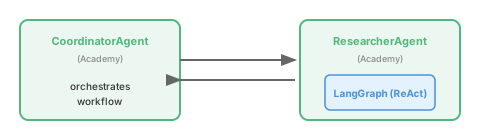
What you learn:
- Initializing LangGraph inside Academy agents
- Exposing LLM capabilities via @action
- Coordinator pattern with intelligent workers
Production Deployment
The same code runs locally and on DOE infrastructure:
Local Development
from academy.exchange import LocalExchangeFactory

async with await Manager.from_exchange_factory(
    factory=LocalExchangeFactory(),
) as manager:
    researcher = await manager.launch(ResearcherAgent)
    result = await researcher.research("optimize battery materials")
HPC Deployment
from academy.exchange import GlobusComputeExchange

async with await Manager.from_exchange_factory(
    factory=GlobusComputeExchange(endpoint_id="..."),
) as manager:
    # Same code, but researcher runs on HPC
    researcher = await manager.launch(ResearcherAgent)
    result = await researcher.research("optimize battery materials")
Federated Deployment
# Agents at different institutions
anl_researcher = await manager.launch(ResearcherAgent, endpoint="anl-aurora")
ornl_data = await manager.launch(DataAgent, endpoint="ornl-frontier")

# Cross-institutional collaboration
await anl_researcher.set_data_source(ornl_data)
result = await anl_researcher.research("analyze neutron scattering data")
Common Patterns
Pattern: LLM-Guided Workflow
The LLM decides what tools to call and in what order:
@tool
def run_dft(structure: str) -> dict:
    """Run DFT calculation on a molecular structure."""
    # Submit to HPC...
    return {"energy": -127.5, "converged": True}

@tool
def run_md(structure: str, temperature: float) -> dict:
    """Run molecular dynamics simulation."""
    # Submit to HPC...
    return {"trajectory": "...", "steps": 10000}

class ComputeAgent(Agent):
    @action
    async def compute(self, task: str) -> dict:
        """LLM decides which calculations to run."""
        self._init_langgraph()  # Has run_dft, run_md tools

        result = self._langgraph_agent.invoke({
            "messages": [HumanMessage(content=task)]
        })
        return {"result": result["messages"][-1].content}
Pattern: Multi-Agent LLM Collaboration
Multiple LLM-powered agents working together:
class ScientistAgent(Agent):
    """Proposes experiments based on literature."""
    # LangGraph with literature search tools

class EngineerAgent(Agent):
    """Designs experimental protocols."""
    # LangGraph with protocol design tools

class AnalystAgent(Agent):
    """Interprets results and suggests next steps."""
    # LangGraph with analysis tools

# Wire them together
scientist = await manager.launch(ScientistAgent)
engineer = await manager.launch(EngineerAgent)
analyst = await manager.launch(AnalystAgent)

# Scientist proposes, engineer designs, analyst evaluates
proposal = await scientist.propose("improve catalyst efficiency")
protocol = await engineer.design(proposal)
evaluation = await analyst.evaluate(protocol)
Pattern: Human-in-the-Loop
LLM proposes, human approves:
class ProposalAgent(Agent):
    @action
    async def propose_experiment(self, goal: str) -> dict:
        """Generate an experiment proposal for human review."""
        self._init_langgraph()
        result = self._langgraph_agent.invoke({
            "messages": [HumanMessage(content=f"Propose an experiment to: {goal}")]
        })
        return {
            "proposal": result["messages"][-1].content,
            "status": "pending_approval"
        }

    @action
    async def execute_approved(self, proposal_id: str) -> dict:
        """Execute a human-approved proposal."""
        # Only runs after human approval
        ...
Production Examples
These examples show LangGraph + Academy in production contexts:
| Example | What It Shows |
|---|---|
| AgentsHPCJob | LLM-guided HPC job submission and monitoring |
| CharacterizeChemicals | LLM plans molecular analysis workflow |
Production Checklist
Before deploying to production:
- LLM access: Configure OpenAI, FIRST, or Ollama backend
- Exchange: Replace LocalExchangeFactory with production exchange
- Identity: Configure Globus Auth or institutional identity
- Persistence: Set up state storage (database, object store)
- Policy: Define governance rules for tool access
- Monitoring: Add logging and observability
- Error handling: Implement retry and recovery logic
Next Steps
You now have the foundation for production scientific agents. Explore these advanced topics:
| Topic | Where to Learn |
|---|---|
| Governed tool use | Governed Tool Use — Policy enforcement for expensive/dangerous tools |
| Multi-agent coordination | Multi-Agent Coordination — Many agents under shared governance |
| Long-lived agents | Long-Lived Agents — Agents that run for days to months |
| Workflow integration | Agent Workflows — Dynamic scientific workflow construction |
Quick Reference
Minimal Hybrid Agent
from academy.agent import Agent, action
from langchain_openai import ChatOpenAI
from langchain_core.messages import HumanMessage
from langgraph.prebuilt import create_react_agent

class HybridAgent(Agent):
    def __init__(self):
        super().__init__()
        self._agent = None

    def _init_agent(self):
        if self._agent is None:
            llm = ChatOpenAI(model="gpt-4o-mini")
            self._agent = create_react_agent(llm, [your_tools])

    @action
    async def run(self, task: str) -> dict:
        self._init_agent()
        result = self._agent.invoke({"messages": [HumanMessage(content=task)]})
        return {"result": result["messages"][-1].content}
Running Hybrid Agents
from academy.manager import Manager
from academy.exchange import LocalExchangeFactory

async def main():
    async with await Manager.from_exchange_factory(
        factory=LocalExchangeFactory(),
    ) as manager:
        agent = await manager.launch(HybridAgent)
        result = await agent.run("your task here")
        print(result)

if __name__ == "__main__":
    import asyncio
    asyncio.run(main())
Congratulations! You’ve completed the Getting Started guide. You now understand:
- LangGraph for LLM reasoning and tool calling
- Academy for distributed agent execution
- Hybrid patterns for production scientific agents
Start building your own scientific agents, or explore the full examples index for more patterns and use cases.