Long-Lived Agent with Checkpoint/Resume
An agent that persists across sessions through automatic checkpointing.
Code: View on GitHub
What It Does
Demonstrates patterns for agents that run for days to months:
- Automatic checkpointing: Save state after each task
- Resume from interruption: Restart exactly where you left off
- Signal handling: Graceful shutdown on Ctrl+C or SIGTERM
- Multi-step workflows: Track tasks, progress, and findings
Running the Example
Start a new workflow:
cd Capabilities/long-lived-agents/AgentsCheckpoint
python -m venv .venv && source .venv/bin/activate
pip install -r requirements.txt
python main.py --goal "Analyze catalyst performance"
Interrupt with Ctrl+C, then resume:
python main.py --resume
List available checkpoints:
python main.py --list
LLM Configuration
Supports OpenAI, FIRST (HPC inference), Ollama (local), or mock mode.
See LLM Configuration for details.
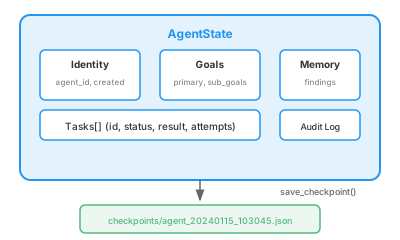
Checkpoint Architecture
Key Patterns
Automatic checkpointing after each task:
def complete_task(self, task_id: str, result: str):
    task.status = TaskStatus.COMPLETED
    task.result = result
    self.steps_completed += 1
    self.save_checkpoint("task_completed")
Graceful shutdown on signals:
def handle_signal(signum, frame):
    print("Received signal, saving checkpoint...")
    STATE.save_checkpoint("signal_interrupt")
    exit(0)

signal.signal(signal.SIGINT, handle_signal)
signal.signal(signal.SIGTERM, handle_signal)
Resume interrupted work:
def get_next_task(self) -> Optional[Task]:
    # First, resume any in-progress tasks
    for task in self.tasks:
        if task.status == TaskStatus.IN_PROGRESS:
            return task
    # Then get next pending task
    for task in self.tasks:
        if task.status == TaskStatus.PENDING:
            return task
    return None
Tools
| Tool | Description |
|---|---|
save_checkpoint |
Manually save state |
remember_finding |
Store important finding |
recall_finding |
Retrieve stored finding |
get_progress |
Show workflow progress |
mark_task_complete |
Complete a task with result |
Checkpoint Files
Checkpoints are stored in checkpoints/:
checkpoints/
  agent_20240115_103045.json       # Latest state
  agent_20240115_103045_0001.json  # Backup after checkpoint 1
  agent_20240115_103045_0002.json  # Backup after checkpoint 2
Example Session
$ python main.py --goal "Analyze catalyst data"

============================================================
LONG-LIVED AGENT WITH CHECKPOINT/RESUME
============================================================
Agent ID: agent_20240115_103045
Goal: Analyze catalyst data
Progress: 0/4
============================================================

--- Task: t1_analyze ---
Description: Analyze existing data
Result: Analysis complete: Mean=42.3, Std=5.7

--- Task: t2_simulate ---
Description: Run computational simulation
^C
[SIGNAL] Received signal 2, saving checkpoint...
[SIGNAL] Checkpoint saved. Exiting.

$ python main.py --resume

Resuming agent agent_20240115_103045...
Progress: 1/4

--- Task: t2_simulate ---
Description: Run computational simulation
(continues from where it left off)
Production Considerations
This example demonstrates the patterns. Production systems should add:
- Distributed storage: Store checkpoints in S3, GCS, or shared filesystem
- Checkpoint compression: Compress large state for efficiency
- Retention policy: Clean up old checkpoint backups
- Health monitoring: Alert if agent stalls or fails repeatedly
- Idempotent tasks: Ensure tasks can be safely re-run
Requirements
- Python 3.10+
- LangGraph 1.0+
- OpenAI API key, FIRST token, Ollama, or run in mock mode