Stage 1: LLM Agents with LangGraph
Learn to build agents that reason and call tools using LangGraph.
What is LangGraph?
LangGraph is a framework for building stateful, multi-step applications with LLMs. It excels at:
- Tool calling — LLMs that invoke functions based on user requests
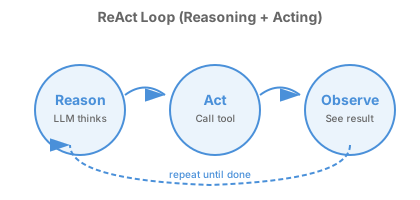
- ReAct patterns — Reasoning + Acting loops where the LLM thinks, acts, observes, repeats
- State management — Tracking conversation history, intermediate results, workflow progress
- Structured workflows — Defining explicit flows between processing steps
LangGraph is part of the LangChain ecosystem but focuses specifically on agent orchestration.
Key Concepts
1. Tools
Tools are functions the LLM can call. Use the @tool decorator:
from langchain_core.tools import tool

@tool
def calculate(expression: str) -> str:
    """Evaluate a mathematical expression.

    Args:
        expression: A math expression like "2 + 2" or "sqrt(16)"
    """
    import math
    return str(eval(expression, {"__builtins__": {}, "math": math}))

@tool
def search_papers(query: str) -> str:
    """Search scientific literature.

    Args:
        query: Search terms for finding relevant papers
    """
    # In production, this would call a real API
    return f"Found 47 papers matching '{query}'"
Important: The docstring becomes the tool description the LLM sees. Be specific about what the tool does and what arguments it expects.
2. ReAct Agents
The simplest LangGraph agent uses the ReAct (Reasoning + Acting) pattern:
from langchain_openai import ChatOpenAI
from langgraph.prebuilt import create_react_agent
from langchain_core.messages import HumanMessage

# Create the LLM
llm = ChatOpenAI(model="gpt-4o-mini")

# Create an agent with tools
agent = create_react_agent(llm, [calculate, search_papers])

# Run the agent
result = agent.invoke({
    "messages": [HumanMessage(content="What is 15% of 847?")]
})

# The agent's response
print(result["messages"][-1].content)
The ReAct loop:
- Reason — LLM decides what to do
- Act — Call a tool (or respond directly)
- Observe — See the tool result
- Repeat — Until the task is complete
3. State Graphs (Advanced)
For complex workflows, define explicit state and transitions:
from langgraph.graph import StateGraph, START, END
from typing import TypedDict, Annotated
from operator import add

class ResearchState(TypedDict):
    messages: Annotated[list, add]
    papers_found: list
    analysis_complete: bool

def search_node(state: ResearchState) -> dict:
    # Search for papers
    return {"papers_found": ["paper1", "paper2"]}

def analyze_node(state: ResearchState) -> dict:
    # Analyze the papers
    return {"analysis_complete": True}

# Build the graph
graph = StateGraph(ResearchState)
graph.add_node("search", search_node)
graph.add_node("analyze", analyze_node)
graph.add_edge(START, "search")
graph.add_edge("search", "analyze")
graph.add_edge("analyze", END)

# Compile and run
app = graph.compile()
result = app.invoke({"messages": [], "papers_found": [], "analysis_complete": False})
Hands-On Examples
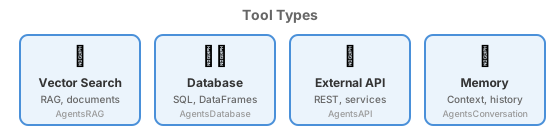
Work through these examples in order:
Example 1: Calculator Agent (Minimal)
The simplest possible agent—just math.
cd Capabilities/local-agents/AgentsCalculator
python -m venv .venv && source .venv/bin/activate
pip install -r requirements.txt
python main.py
What you learn: @tool decorator, create_react_agent, basic invocation
Example 2: RAG Agent (Vector Search)
An agent that searches scientific documents.
cd Capabilities/local-agents/AgentsRAG
python -m venv .venv && source .venv/bin/activate
pip install -r requirements.txt
python main.py
What you learn: Vector stores, retrieval tools, grounding LLM responses in documents
Example 3: Database Agent (Structured Data)
Natural language queries on pandas DataFrames.
cd Capabilities/local-agents/AgentsDatabase
python -m venv .venv && source .venv/bin/activate
pip install -r requirements.txt
python main.py
What you learn: Structured data tools, query generation, result formatting
Example 4: API Agent (External Services)
An agent that calls external APIs (PubChem for chemical data).
cd Capabilities/local-agents/AgentsAPI
python -m venv .venv && source .venv/bin/activate
pip install -r requirements.txt
python main.py
What you learn: HTTP tools, API integration, parsing external data
Example 5: Conversation Agent (Memory)
Stateful conversations with short and long-term memory.
cd Capabilities/local-agents/AgentsConversation
python -m venv .venv && source .venv/bin/activate
pip install -r requirements.txt
python main.py
What you learn: Conversation state, memory patterns, context management
Example 6: Multi-Agent Pipeline (StateGraph)
Five agents working in sequence using StateGraph.
cd Capabilities/local-agents/AgentsLangGraph
python -m venv .venv && source .venv/bin/activate
pip install -r requirements.txt
python main.py
What you learn: StateGraph, typed state, multi-node workflows, edge definitions
Common Patterns
Pattern: Tool with Validation
@tool
def run_simulation(temperature: float, pressure: float) -> str:
    """Run a molecular dynamics simulation.

    Args:
        temperature: Temperature in Kelvin (must be > 0)
        pressure: Pressure in atmospheres (must be > 0)
    """
    if temperature <= 0 or pressure <= 0:
        return "Error: temperature and pressure must be positive"
    # Run simulation...
    return f"Simulation complete at {temperature}K, {pressure}atm"
How this enables self-correction: The error message becomes an “observation” in the ReAct loop. When the LLM sees "Error: temperature must be positive", it reasons about the mistake and retries with corrected parameters. This isn’t an automatic retry—the LLM decides to try again based on understanding the error.
Return helpful error strings rather than raising exceptions. The LLM can understand "temperature must be positive" and correct its approach; a Python traceback is less useful for reasoning.
Pattern: Tool that Returns Structured Data
@tool
def analyze_molecule(smiles: str) -> dict:
    """Analyze a molecule from its SMILES string.

    Args:
        smiles: SMILES representation of the molecule
    """
    # Analysis logic...
    return {
        "molecular_weight": 180.16,
        "num_atoms": 12,
        "num_bonds": 12,
        "is_valid": True
    }
Pattern: Conditional Tool Execution
def should_search(state: ResearchState) -> str:
    """Decide whether to search or skip."""
    if state.get("papers_found"):
        return "skip_search"
    return "do_search"

graph.add_conditional_edges("start", should_search, {
    "do_search": "search_node",
    "skip_search": "analyze_node"
})
LLM Configuration
All examples support multiple backends:
| Backend | Setup | Best For |
|---|---|---|
| OpenAI | export OPENAI_API_KEY=... |
General use, best quality |
| Ollama | Install Ollama, run model | Local/offline, privacy |
| FIRST | DOE credentials | DOE infrastructure |
| Mock | No setup needed | Testing, CI/CD |
See LLM Configuration for detailed setup instructions.
When You’re Ready for Stage 2
You’ve mastered LangGraph basics when you can:
- Create tools with the
@tooldecorator - Build a ReAct agent with
create_react_agent - Understand how the LLM decides which tools to call
- Use StateGraph for multi-step workflows
Limitation of LangGraph alone: Everything runs in a single process. You can’t easily:
- Run agents on different machines
- Distribute work across HPC nodes
- Collaborate across institutional boundaries
That’s where Academy comes in.