Stage 2: Distributed Agents with Academy
Learn to run agents across machines using Academy.
What is Academy?
Academy is an agent framework designed for distributed scientific computing. It excels at:
- Cross-machine execution — Agents can run on different computers
- Secure messaging — Communication with identity and policy enforcement
- HPC integration — Built for DOE supercomputers and scientific infrastructure
- Long-running workflows — Agents that persist for hours, days, or months
- Federation — Collaboration across institutional boundaries
Why Academy for Scientific Computing?
LangGraph is great for LLM reasoning, but scientific workflows need more:
| Requirement | LangGraph | Academy |
|---|---|---|
| LLM reasoning | Excellent | Use LangGraph inside |
| Run on multiple machines | Limited | Built-in |
| HPC job submission | Manual | Native |
| Cross-institutional | Not designed for | Core feature |
| Persistent agents | Checkpointing | Native |
Academy doesn’t replace LangGraph—it provides the distributed substrate that LangGraph agents run on.
Key Concepts
1. Agents are Classes
Academy agents are Python classes that inherit from Agent:
from academy.agent import Agent, action

class CalculatorAgent(Agent):
    """An agent that performs calculations."""

    @action
    async def calculate(self, expression: str) -> str:
        """Evaluate a math expression."""
        result = eval(expression, {"__builtins__": {}}, {})
        return f"{expression} = {result}"
2. Actions are Remote-Callable Methods
The @action decorator marks methods that can be called from other agents or the main process:
@action
async def run_simulation(self, parameters: dict) -> dict:
    """This method can be called remotely."""
    # Run simulation...
    return {"energy": -127.5, "status": "completed"}
Key point: Actions can be called from anywhere—same process, different machine, different institution. Academy handles the communication.
3. Manager Launches Agents
The Manager is the Academy runtime. It launches agents and manages their lifecycle:
from academy.manager import Manager
from academy.exchange import LocalExchangeFactory

async with await Manager.from_exchange_factory(
    factory=LocalExchangeFactory(),  # Local for development
) as manager:
    # Launch an agent
    calculator = await manager.launch(CalculatorAgent)

    # Call its actions
    result = await calculator.calculate("2 + 2")
    print(result)  # "2 + 2 = 4"
4. Handles Enable Communication
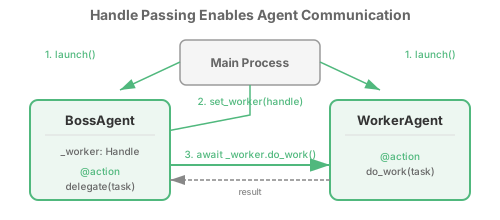
When you launch an agent, you get a Handle—a proxy that lets you call the agent’s actions:
# Launch returns a Handle (not the agent itself)
calculator = await manager.launch(CalculatorAgent)

# The Handle lets you call actions
result = await calculator.calculate("42 * 17")
Critical concept: Handles can be passed to other agents. This enables agent-to-agent communication:
class CoordinatorAgent(Agent):
    @action
    async def set_worker(self, worker: Handle) -> None:
        """Receive a Handle to another agent."""
        self._worker = worker

    @action
    async def delegate(self, task: str) -> str:
        """Call the worker's action."""
        return await self._worker.do_work(task)
Hands-On Examples
Work through these examples in order:
Example 1: Academy Basic (Hello World)
Two agents communicating—the minimal Academy example.
cd Capabilities/local-agents/AgentsAcademyBasic
python -m venv .venv && source .venv/bin/activate
pip install -r requirements.txt
python main.py
What you learn: Agent class, @action decorator, Manager, Handle
Example 2: Remote Tools Pattern
A Coordinator that calls tools on a ToolProvider agent.
cd Capabilities/local-agents/AgentsRemoteTools
python -m venv .venv && source .venv/bin/activate
pip install -r requirements.txt
python main.py
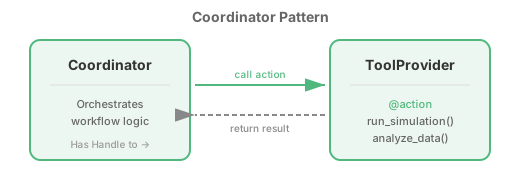
What you learn: Passing Handles, remote action calls, the Coordinator pattern
Example 3: Persistent State
Workflows that checkpoint progress and resume after restarts.
cd Capabilities/local-agents/AgentsPersistent
python -m venv .venv && source .venv/bin/activate
pip install -r requirements.txt

# Run workflow
python main.py

# Interrupt with Ctrl+C, then resume
python main.py  # Continues from checkpoint!

# Start fresh
python main.py --reset
What you learn: State persistence, checkpointing, resumable workflows
Example 4: Federated Collaboration
Agents at different institutions (ANL, ORNL, LBNL) working together.
cd Capabilities/local-agents/AgentsFederated
python -m venv .venv && source .venv/bin/activate
pip install -r requirements.txt
python main.py
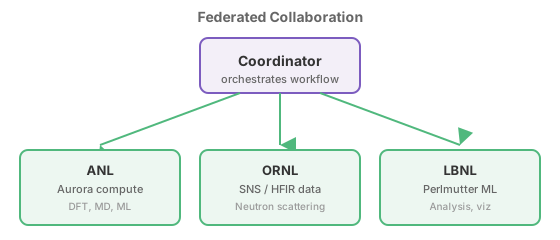
What you learn: Cross-institutional patterns, capability discovery, federated workflows
Common Patterns
Pattern: Coordinator + Tool Providers
One agent orchestrates, others provide capabilities:
class CoordinatorAgent(Agent):
    def __init__(self):
        self._tools: dict[str, Handle] = {}

    @action
    async def register_tool(self, name: str, provider: Handle) -> None:
        self._tools[name] = provider

    @action
    async def execute_workflow(self, task: str) -> dict:
        # Use registered tool providers
        sim_result = await self._tools["simulation"].run(task)
        analysis = await self._tools["analysis"].analyze(sim_result)
        return {"simulation": sim_result, "analysis": analysis}
Pattern: Pipeline (Agent-to-Agent)
Each agent forwards results to the next:
class ProcessorAgent(Agent):
    @action
    async def set_next(self, next_agent: Handle) -> None:
        self._next = next_agent

    @action
    async def process(self, data: dict) -> dict:
        result = self._do_processing(data)
        if self._next:
            return await self._next.process(result)
        return result
Pattern: Hub-and-Spoke
Central coordinator calls each agent sequentially:
async def run_hub_spoke(manager, task):
    scout = await manager.launch(ScoutAgent)
    planner = await manager.launch(PlannerAgent)
    operator = await manager.launch(OperatorAgent)

    opportunities = await scout.survey(task)
    plan = await planner.design(opportunities)
    results = await operator.execute(plan)
    return results
Development vs Production
These examples use LocalExchangeFactory for development. In production:
| Aspect | Development | Production |
|---|---|---|
| Exchange | LocalExchangeFactory | GlobusComputeExchange, RedisExchange |
| Location | Same process | Across machines/institutions |
| Identity | None | Globus Auth, InCommon |
| Policy | None | Academy governance layer |
The same agent code works in both environments—only the exchange factory changes.
When You’re Ready for Stage 3
You’ve mastered Academy basics when you can:
- Create agents with the
Agentbase class - Mark remote methods with
@action - Launch agents and call actions via Handles
- Pass Handles between agents for communication
- Understand the Coordinator pattern
What’s missing: Your Academy agents don’t have LLM intelligence yet. They execute predefined logic, not adaptive reasoning.
The solution: Put LangGraph inside Academy agents. Academy handles distribution; LangGraph handles intelligence.